 Timory
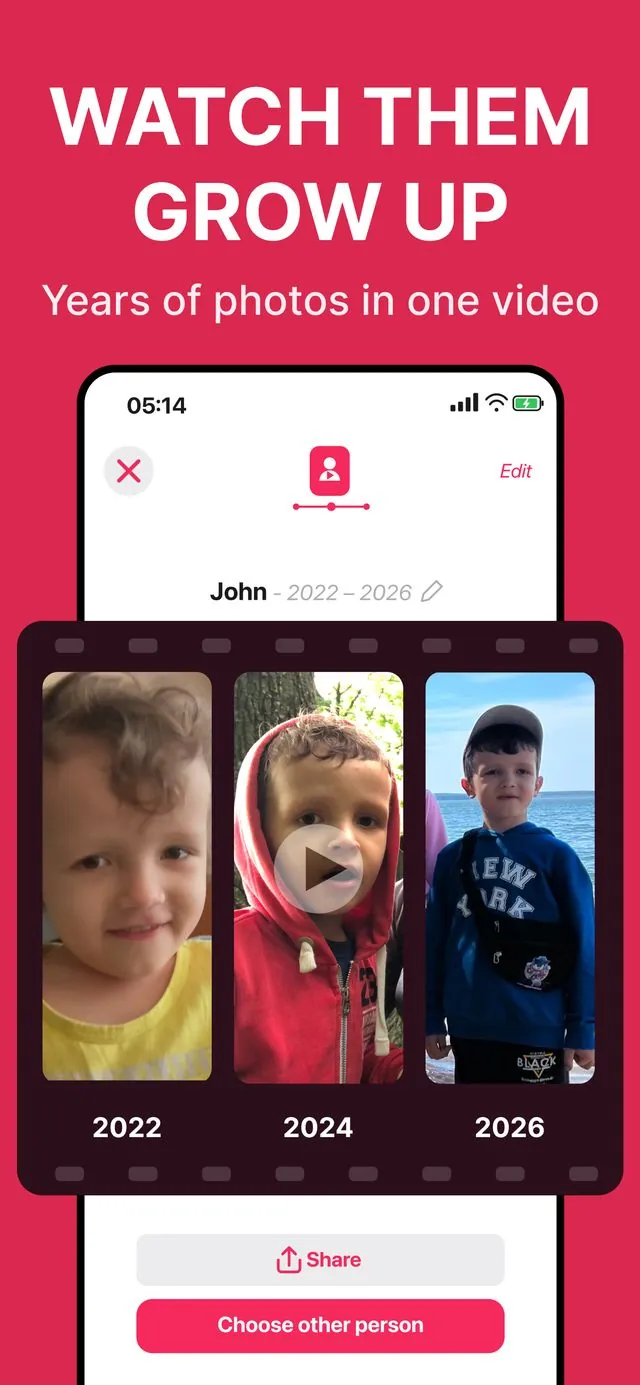
Watch them grow up.
Every photo. One video.
Timory is a memory video maker for iPhone: it finds every photo of someone you love, puts a lifetime in order, and turns it into one cinematic timeline video — automatically, privately, on your phone.
How it works
Three steps between “thousands of scattered photos” and “the video everyone asks you to send them”.
Timory scans your library
On-device AI finds every face in your photos and videos and groups them by person — kids, adults, grandparents. Nothing is uploaded anywhere.
Pick a person and the years
Choose who the video is about and set the time range — from a first birthday to a whole lifetime. Every photo and video of them appears in chronological order. Add or remove any shot.
Create, customize, share
Timory builds a smooth timeline video with transitions. Add music, trim clips, apply filters, export up to 4K, and share to Instagram, WhatsApp, or iMessage.
The whole story — not a highlight reel
Auto-generated “memories” pick a few dozen shots an algorithm liked and set them to a template. Timory is built for something else: the complete, chronological story of one person.
Auto-generated memories
- A short curated highlight, chosen for you
- ~30–60 “best” shots, the rest left out
- Appears when the algorithm feels like it
- Limited control over what makes the cut
Timory timeline video
- Every photo & video of the person, in order
- You choose the years, the clips, the music
- Made on demand — for birthdays, memorials, milestones
- Trim, filter, reorder — you decide, not the algorithm
See Timory in action
From a messy library to a video worth keeping — this is what it looks like along the way.


Made for the moments that matter
One app, every occasion where a lifetime of photos should become one story.
Growing-up videos
Relive your child's growth year by year — from first steps to graduation, in one continuous timeline.
Memorial & tribute videos
Honor someone you've lost with a respectful, chronological video for a funeral or celebration of life.
Birthday & milestone videos
Mark a 60th birthday, an anniversary, or a graduation with the story of the years that led there.
Private by design
Face recognition runs on your iPhone. No cloud, no account, no data collection — photos never leave your device.
Music, filters, control
Choose the soundtrack, apply filters, trim any clip, set the date range. You decide, not the algorithm.
4K export & easy sharing
Export up to 4K and share straight to Instagram, WhatsApp, iMessage, or save to your camera roll.
Guides
Step-by-step answers to the questions that bring people here — each one ends with a video worth keeping.
How to Make a Funeral Slideshow on Your iPhone
Gather every photo of your loved one automatically and build a respectful chronological video in an evening.
MemorialHow to Make a Celebration of Life Video
A warmer kind of memorial: the whole life, in order, set to the music they loved.
MemorialHow to Make an “In Loving Memory” Video
A tribute video from the photos you already have — without reliving the whole library by hand.
FamilyHow to Make a Video of Your Child Growing Up
From newborn to now in one video — Timory finds and orders every photo for you.
OccasionsHow to Make a Birthday Tribute Video
For a 40th, 60th, or any milestone: the story of their years as the gift.
OccasionsHow to Make a Graduation Slideshow
Kindergarten to cap-and-gown: build the video that makes the whole room cry.
How-toHow to Find All Photos of One Person on iPhone
What Photos can do, where it stops, and how to turn the result into a timeline video.
How-toHow to Turn Old Photos into a Video with Music
Scattered camera roll to one cinematic video — transitions, soundtrack, and 4K export included.
Frequently asked questions
How do I make a funeral slideshow on my iPhone?
Open Timory, let it scan your library, pick the person you're honoring, and choose a date range. The app assembles every photo and video of them into one chronological video with music — export in 1080p for the service or 4K for a big screen. Learn more
Can an app find all photos of one person on my iPhone?
Yes. Timory scans your library on-device, recognizes faces, and groups every photo and video by person — across all the years. From there, one tap turns a person into a timeline video. Learn more
How do I make a video of my child growing up?
Timory finds every photo of your child from birth to today, sorts them by date, and builds one smooth growing-up video with transitions and music. You choose the years, the clips, and the soundtrack. Learn more
What's the best way to make a memorial or tribute video?
The hardest part is gathering the photos. Timory does that automatically — it finds every photo of the person in your library and puts a lifetime in order, so you can focus on the words and the music. Learn more
Does Timory upload my photos to the cloud?
No. Face recognition and video creation happen entirely on your iPhone. Your photos and face data never leave your device — no cloud, no account, no data collection.
How is Timory different from auto-generated Memories?
Auto-generated memories are a short highlight an algorithm picked for you. Timory gives you the whole story — every photo and video of the person in chronological order, with full control over years, clips, music, and filters.
Can I add music and choose video quality?
Yes — pick a soundtrack, apply filters, trim any clip, and export from 480p up to 4K. 1080p is the sweet spot for social sharing. Learn more
Is Timory free?
Timory is free to download and try. Longer videos and premium features are unlocked with a subscription or a one-time lifetime purchase.
A lifetime of photos is already on your phone
Turn it into the video your family will ask you to send them. Free to try — works entirely on your iPhone.
Download Timory on the App Store